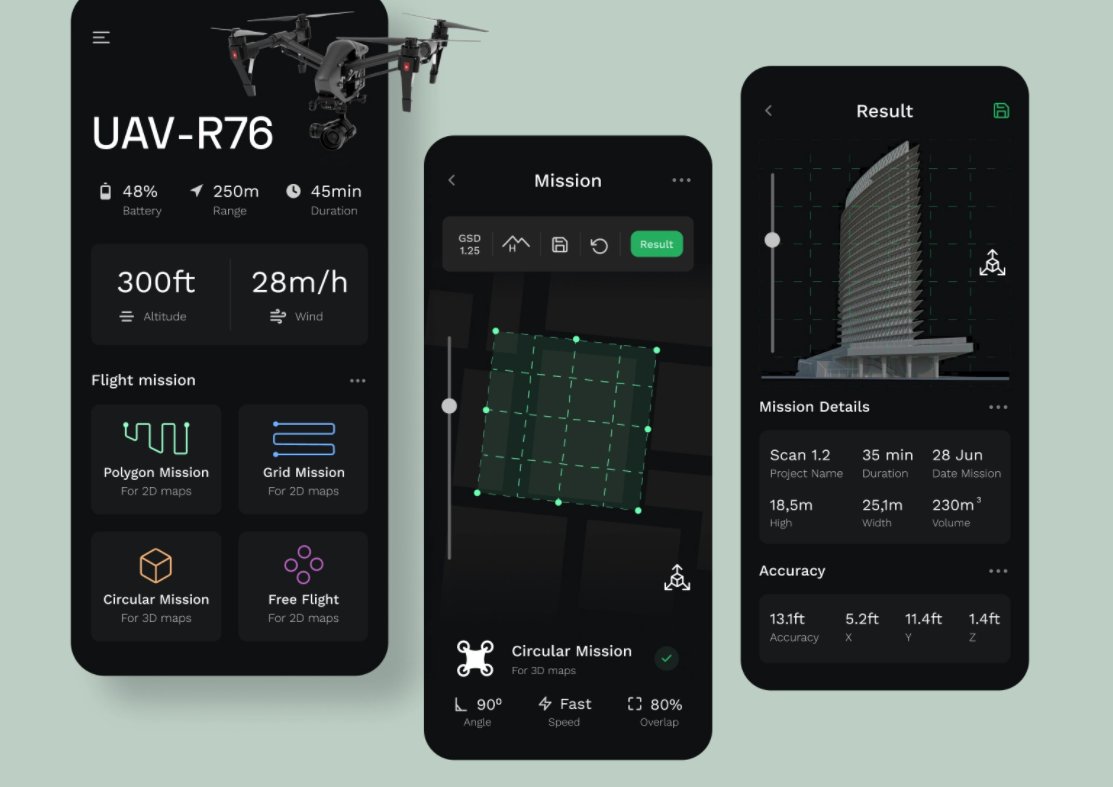

Dark mode has shifted from a trendy aesthetic to a core expectation in modern mobile app design. As more users adopt darker interfaces for comfort, health, and style, businesses and development teams are realising that dark mode isn’t just a “nice feature”it’s a competitive advantage.
Designing dark mode properly requires more than inverting colors or dimming the UI. It demands careful planning, accessibility awareness, emotional design thinking, visual balance, and brand consistency. When it’s done right, users feel comfortable, focused, and emotionally connected to the app. When done poorly, they instantly notice glare, low contrast, and readability issues.
Below is a comprehensive, expert-level guide to building dark mode that enhances usability, strengthens your brand, and elevates user experience across all mobile platforms.
Why Dark Mode Matters More Than Ever
1. User Wellbeing and Comfort
Users spend 6–8 hours a day on screens. Dark mode reduces:
- Eye strain
- Blue light exposure
- Night-time glare
It supports healthier digital habits.
2. Battery Efficiency
On OLED and AMOLED devices, dark pixels consume less power.
This can extend battery life by up to 30% in some devices.
3. Better Content Focus
Dark backgrounds shift attention toward the content, helping users:
- Read more comfortably
- Scan content faster
- Focus during low-light environments
4. It’s a User Preference
Many users expect dark mode as a standard.
Not offering it may cause high bounce rates or app abandonment.
5. Premium Aesthetic and Modern Appeal
A well-executed dark UI communicates:
- Sophistication
- Modernity
- Minimalism
- Technical excellence
This strengthens perceived brand quality.
Foundational Dark Mode Design Principles
1. Don’t Use Pure Black (#000000) Everywhere
Pure black creates uncomfortable contrast.
Instead, use a deep gray palette such as:
- #121212
- #1A1A1A
- #0F0F0F
This gives a softer, more balanced visual experience.
2. Prioritize Contrast Without Overdoing It
Dark mode often suffers from:
- Low contrast text
- Hard-to-read secondary labels
- Washed-out icons
Follow WCAG standards:
- Text contrast ratio: 4.5:1 or higher
- Headings: slightly brighter
- Buttons: emphasized with subtle elevation
The goal is clarity without harsh brightness.
3. Balance Color Vibrancy with Softness
Colors behave differently in dark mode:
- Bright colors can look too neon
- Saturated colours may “vibrate”
- Whites can be blinding
To fix this:
- Use desaturated tones
- Reduce brightness by 10–20%
- Introduce colour with intention, not everywhere
Preserve your brand identity without overwhelming the user.
4. Use Elevation, Not Just Flat Colors
In dark mode, shadows disappear.
Instead of shadows, use:
- Soft highlights
- Light glows
- Subtle borders
This helps structure hierarchy and separates layers.
5. Rethink Surfaces and Layers
Light mode uses light surfaces; dark mode uses:
- Layered translucent surfaces
- Soft gradients
- Dynamic blur backgrounds
This requires different thinking, not color inversion.
6. Rethink Typography for Dark Mode
In dark environments:
- Thin fonts lose visibility
- Low-contrast text becomes invisible
- Overly bright text causes glare
Typography guidelines:
- Use medium or regular weights
- Increase line height slightly
- Use off-white text (#E0E0E0)
- Keep headings slightly brighter
Readable text = better user retention.
7. Adjust Icons, Illustrations, and Visual Assets
Icons should be:
- Lighter
- Clean
- High-contrast
- Without heavy outlines
Illustrations and images:
- Avoid pure white backgrounds
- Introduce alternative dark-mode versions
- Balance saturation and shadows
Consistency across visual elements is crucial.
8. Micro-Interactions Look Different in Dark Mode
Animations should:
- Be smoother
- Use subtle gradients
- Guide attention without flashing
Dark mode enhances motion visibility, so keep transitions calm and intentional.
9. Consider Psychological Impact
Dark mode conveys certain emotions:
- Calm
- Focus
- Mystery
- Sophistication
Your design should support the emotional journey you want users to experience.
Advanced Dark Mode Strategies for Serious Apps
1. Dynamic Dark Mode
Surfaces adapt according to:
- Ambient light
- Time of day
- Usage patterns
More advanced but powerful for usability.
2. Brand Identity Preservation
Rework your brand system for dark backgrounds:
- Alternative brand colours
- Adaptive logos
- New visual language
Brand consistency should survive both modes.
3. AI-Assisted Theme Switching
Some apps now use AI to:
- Detect user preference
- Adjust contrast dynamically
- Optimise readability based on time
This offers a future-forward experience.
4. Performance Optimisation
Dark mode isn't just visual.
It can:
- Reduce GPU strain
- Improve animation smoothness
- Enhance battery life
This improves overall app performance.
Testing and Validation Checklist
Before launching dark mode, test:
✔ In bright and low-light environments
✔ On various screen types
✔ On devices with different brightness settings
✔ With users who have visual impairments
✔ On content-heavy screens
✔ On interactive screens (forms, menus, buttons)
✔ With both long and short sessions
Dark mode must work flawlessly, not just look good in screenshots.
Conclusion
Dark mode is no longer optional it’s a user expectation and a design standard.
But great dark mode goes beyond aesthetics. It requires understanding contrast, color behavior, accessibility, emotional design, and brand consistency.
When done right, dark mode creates:
- Comfort
- Focus
- Elegance
- Performance improvements
- A more premium user experience
Apps that invest in thoughtful dark mode design stand out in a crowded digital landscape and create long-lasting user loyalty.